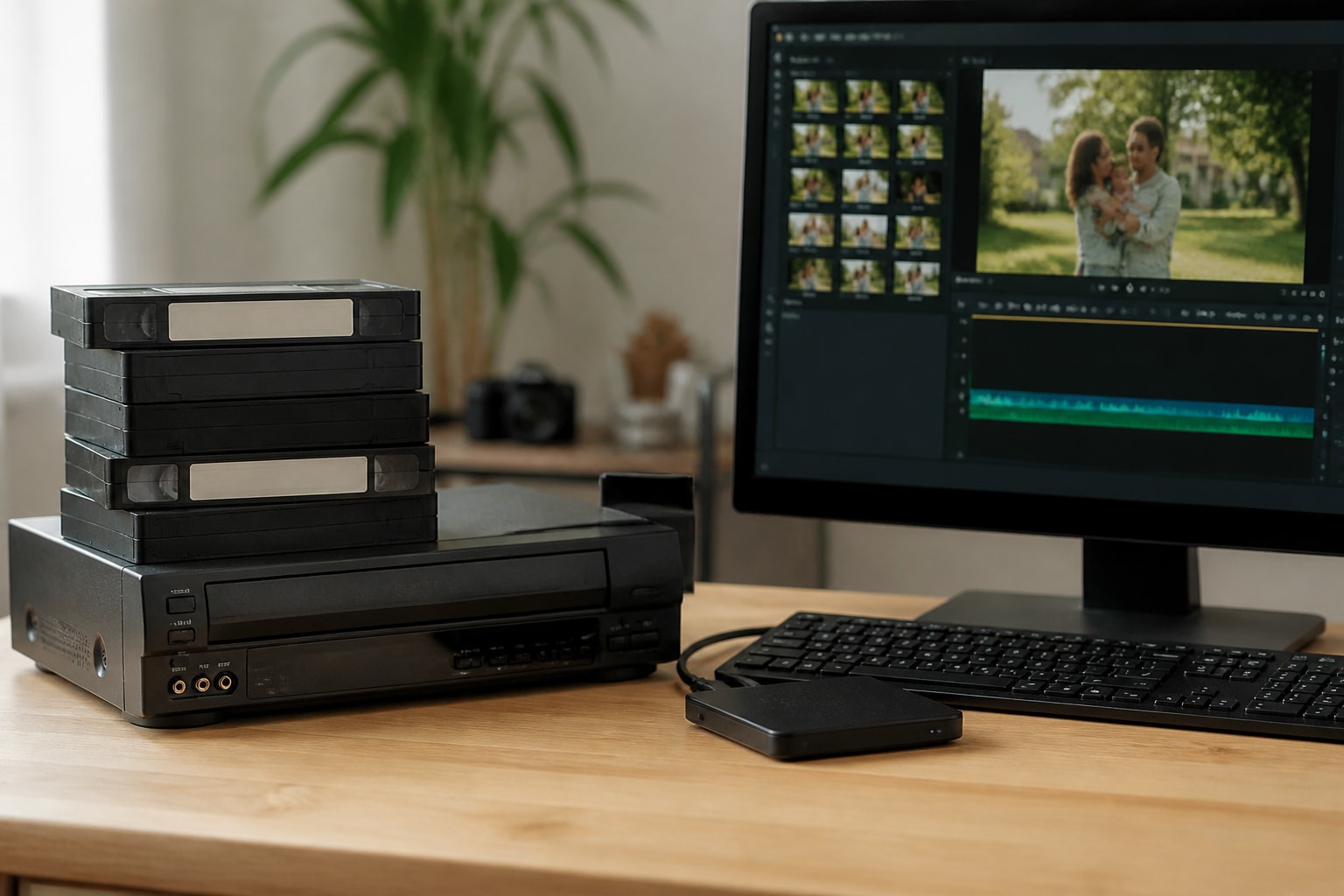
TBC for VHS: How to Choose and Use a Time Base Corrector
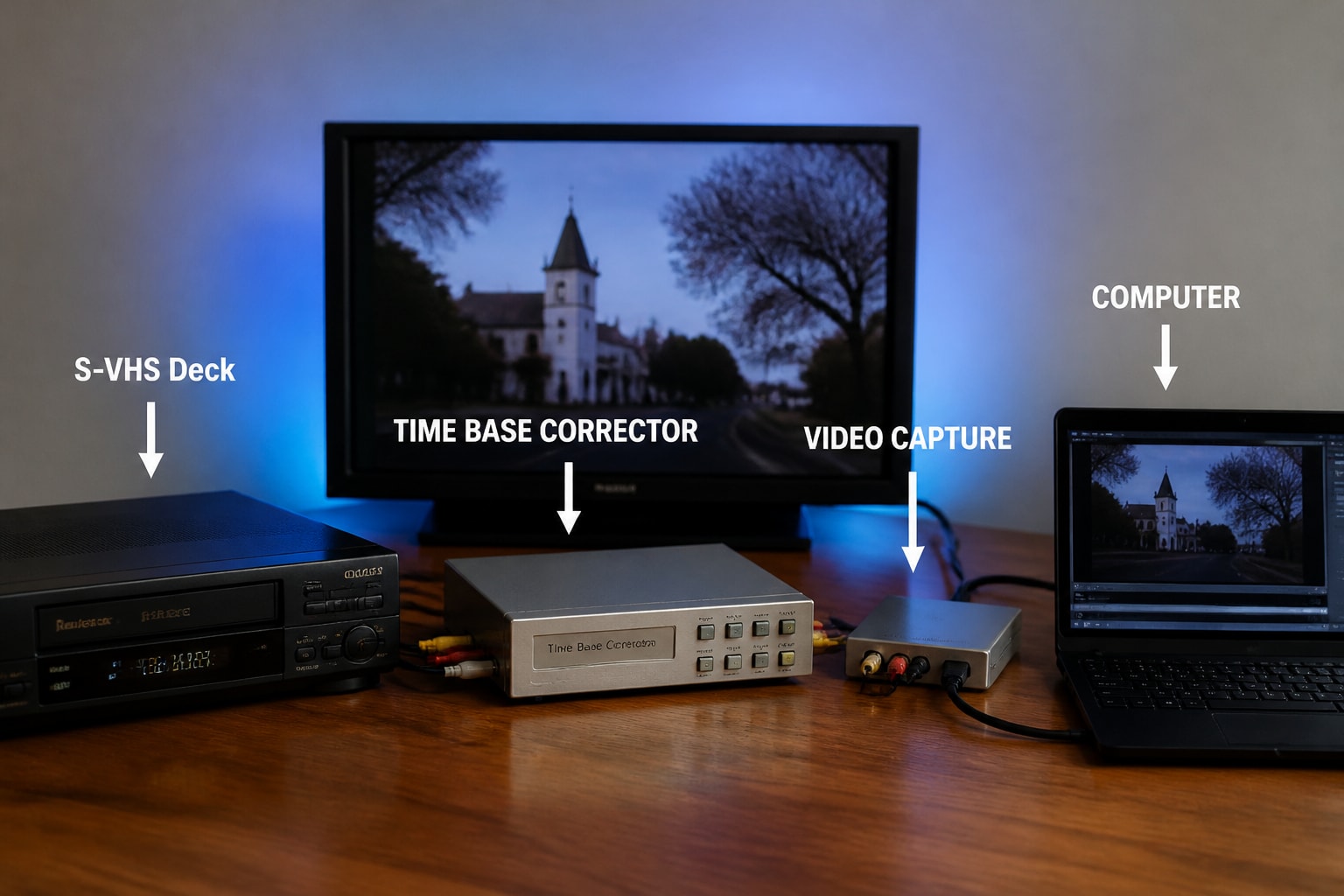
A TBC, or time base corrector, is a device that stabilizes the timing of an analog video signal, and for VHS it is the component that removes wobble, jitter, and dropped sync from a digitized tape. If you are building a capture chain for VHS, a TBC is what turns a watchable transfer into a stable one, and it matters most when tapes are worn, recorded in extended play, or played on a consumer deck.
VHS stores video in a way that guarantees small timing errors on playback. Tape stretches, heads wear, and mechanical speed varies from second to second. A TBC rebuilds a steady signal so your capture device receives clean, consistent timing. This article explains how that works, how to decide between a TBC built into a deck and a standalone unit, and how to wire and test the whole chain.
What a TBC Does for VHS Playback
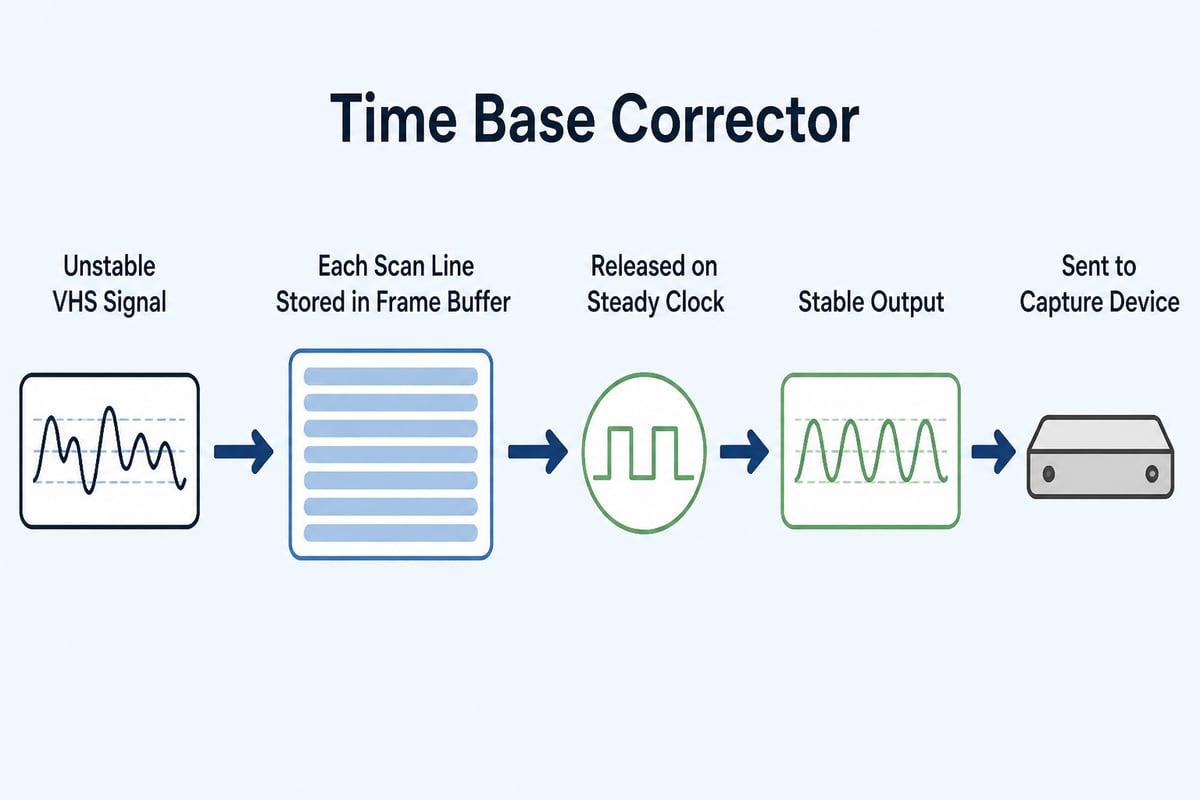
A time base corrector stores each scan line of the incoming video in a memory buffer and releases it at a precise, steady rate, which removes the timing instability that tape mechanics introduce. Without it, the signal leaves the VCR with tiny line-to-line errors that look like shaking vertical edges, bending at the top of the frame, or sudden picture tearing.
VHS is especially prone to these errors for several reasons:
- Mechanical transport: the cassette, capstan, and rotating head drum all vary slightly in speed.
- Tape condition: stretched, creased, or poorly stored tape changes the timing of the signal as it passes the heads.
- Recording speed: SLP and EP recordings pack more information into less tape, which makes timing errors more pronounced.
- Copy-protected or generational tapes: dubbed material often carries unstable sync that a capture card cannot interpret.
Capture devices are designed to expect a broadcast-stable signal. When they receive an unstable one, they may drop frames, lose audio sync, or refuse to lock at all. A TBC acts as the intermediary that gives them a steadier signal.
Built-In TBC vs. Standalone TBC
A built-in TBC corrects timing inside the deck before the signal reaches the output jacks, while a standalone TBC corrects it afterward, and the right choice depends on the decks you have and the tapes you handle. Both approaches can produce excellent results, but they behave differently when a tape is troublesome.
Many professional and prosumer S-VHS decks include a digital TBC and noise reduction circuitry. These are convenient because the correction happens in a single box with fewer cables and fewer points of failure. Some consumer and mid-range VCRs also include line-level TBC or frame synchronization features, though quality varies widely by model.
A standalone TBC sits between the deck and the capture device. It is useful when your deck lacks correction, when the built-in circuit is weak, or when you need a unit that can lock onto a poor signal that a deck's internal TBC would pass through unchanged.
| Approach | Strengths | Limitations |
|---|---|---|
| Built-in deck TBC | Fewer cables, one device to maintain, often tuned to the deck's own output | Quality depends on the model; cannot be upgraded independently |
| Standalone TBC | Can be added to any deck, often more tolerant of unstable sync, swappable if it fails | Extra box, extra cables, additional signal path to troubleshoot |
| Both in sequence | Can improve difficult tapes | Stacking two correctors can introduce artifacts, so test before committing |
For a deeper look at how S-VHS decks differ from standard VHS machines, the S-VHS format page outlines why the higher-bandwidth format is preferred in digitization work.
Why S-VHS Decks Are the Standard for TBC VHS Workflows
Professional S-VHS decks are the standard choice for TBC VHS workflows because they offer a better transport, better heads, and often a built-in correction stage, and they play standard VHS tapes with higher stability than most consumer VCRs. Even if every tape you transfer is plain VHS, an S-VHS machine gives you a more controlled starting signal.
The reasons are practical. Dual-format decks typically include a more precise tracking system, manual tracking controls, and cleaner output circuitry. Broadcast-grade models also add a jog/shuttle dial, which helps you find and stabilize the tape position before recording. The Super VHS VCR guide covers how these decks differ from standard players, and the VHS and S-VHS comparison explains what each format can and cannot do.
For a shop doing volume work, deck condition matters as much as deck model. Worn heads and a tired transport will produce a signal that no TBC can fully rescue, which is why many digitization businesses rent or maintain professional units rather than relying on aging consumer machines.
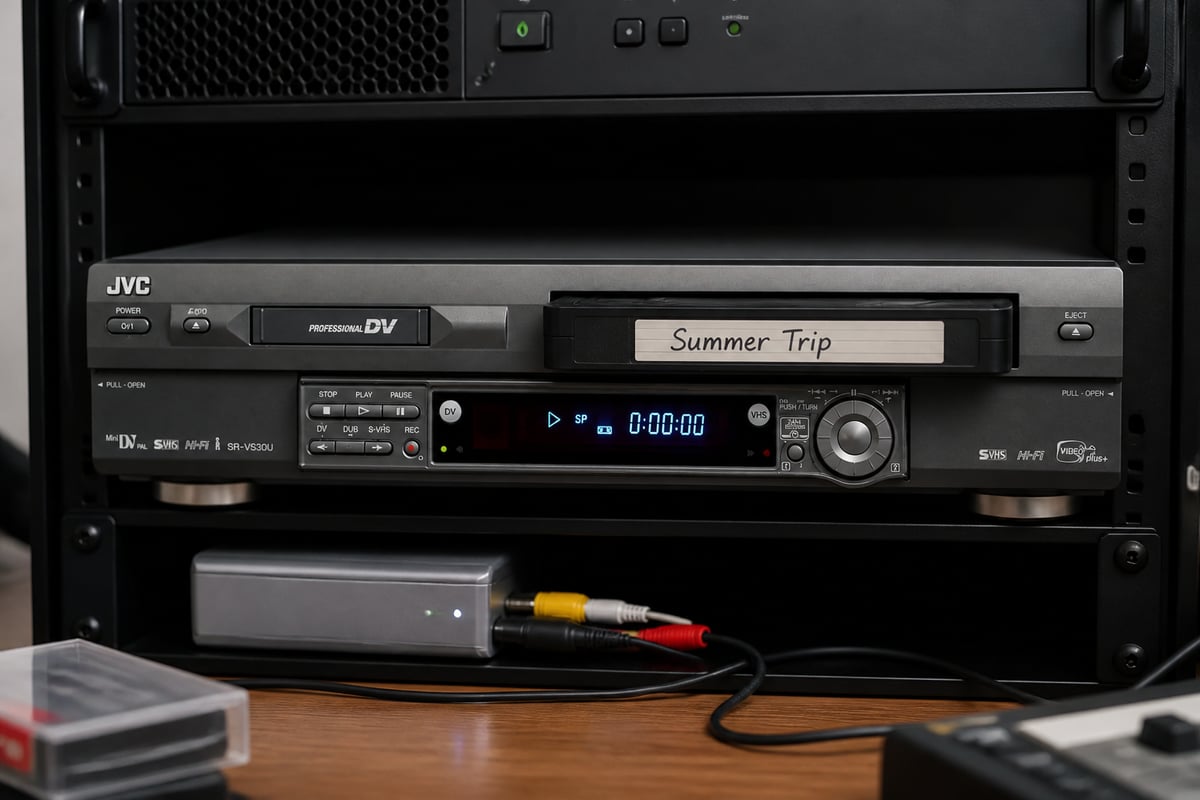
VCR Supply rents a refurbished JVC SR-VS30U dual deck that handles both MiniDV and S-VHS, which suits shops that want one tested machine covering more than one format without buying equipment outright.
How to Connect a TBC in a VHS Capture Chain
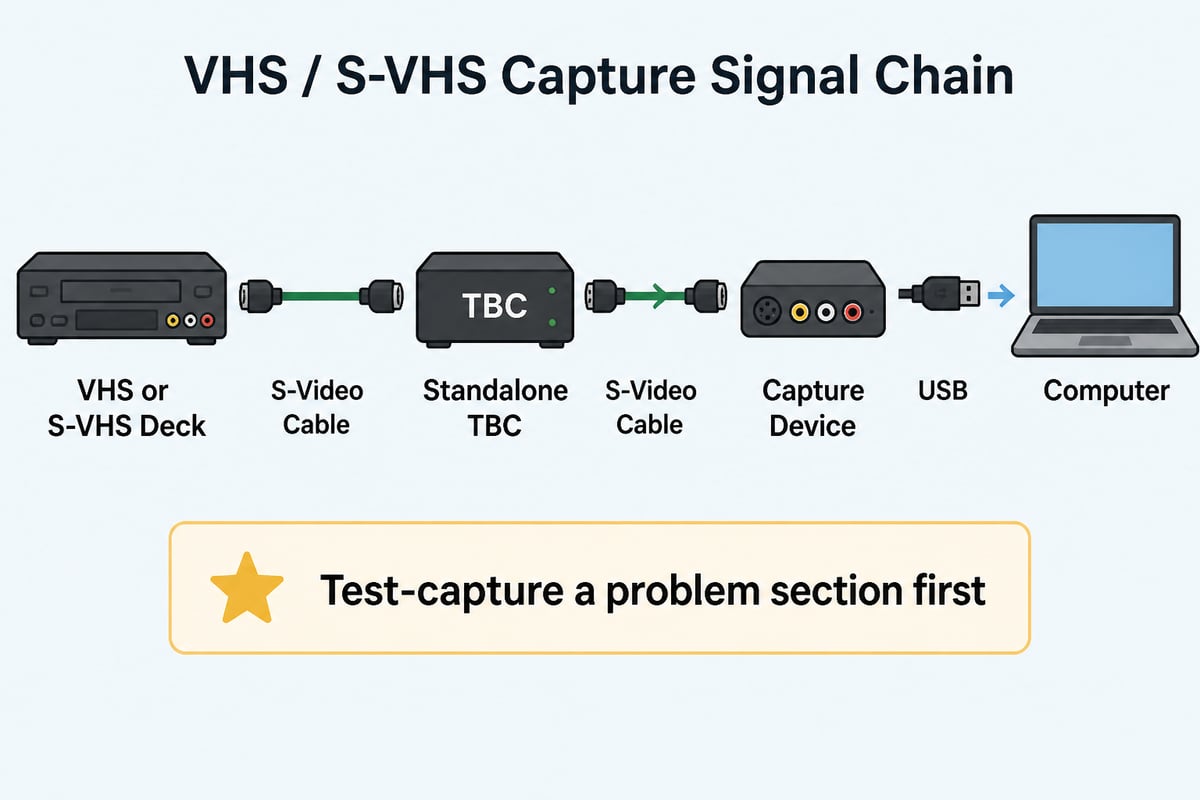
A correct signal chain runs from the VCR's output through the TBC into the capture device, and the connection type you choose determines how much picture quality survives the trip. The goal is to keep the signal analog and clean until it reaches the point where it is converted to digital.
Follow this sequence for a standard setup:
- Connect the deck to the TBC using the best output available. S-Video preserves more detail than composite for S-VHS and for good-quality VHS playback.
- Connect the TBC to your capture device using the same connection type, avoiding adapters where possible.
- Route audio separately if your TBC does not pass audio, or confirm that it does. Some units correct video only.
- Power on the TBC and deck, then load the tape and allow the TBC a few seconds to lock onto the signal.
- Set the TBC's processing options conservatively. Leave aggressive noise reduction and image enhancement off for your first pass.
- Run a short test capture on a problem section of tape and review it before committing to a full transfer.
If your capture device accepts a genlock or reference input, using it can keep the TBC's output aligned with the capture clock. This detail matters most in setups that combine multiple video sources, but it is worth knowing about even in a simple one-deck chain.
Common Problems a TBC Fixes, and Those It Does Not
A TBC corrects timing and sync problems, but it cannot repair physical tape damage, worn heads, dropout from oxide loss, or color errors that originate on the tape itself. Knowing the boundary saves hours of troubleshooting.
What a TBC corrects
- Horizontal jitter and wavering vertical lines
- Bending or flagging at the top of the frame
- Sync instability that causes a capture card to lose lock
- Frame drops caused by timing irregularities in the signal
- Mismatched timing when mixing sources
What it does not correct
- Dropouts, the white or black flecks caused by missing oxide
- Heavy chroma noise or color bleeding from a poor original recording
- Tracking errors caused by a misaligned deck or an incorrect tracking setting
- Audio problems, unless the TBC specifically processes audio
- Physical tape issues such as sticky shed, mold, or a creased edge
The Library of Congress advises against playing damaged tape, because playback can further damage both the media and the equipment. If a tape squeals, sheds oxide, or shows visible mold, stop and address the cassette before it goes near a TBC chain. The VHS tape repair guide covers how to assess and fix common cassette problems.
Choosing a TBC: What to Evaluate
Choose a TBC by checking its frame buffer behavior, input and output formats, and how well it locks to unstable sources, because these three traits decide whether it solves your actual problems. Specifications on a box matter less than how the unit handles a bad tape.
Evaluate these points before you buy or rent:
- Line-level vs. full-frame correction. Line TBCs correct within each scan line, while full-frame TBCs buffer an entire frame and can also resynchronize frame timing. For VHS work, full-frame correction is generally more forgiving.
- Input and output types. Confirm the unit supports S-Video and composite in the way your decks and capture device require.
- Lock performance on poor signals. Test with a worn tape rather than a clean one. A TBC that locks on a pristine tape tells you little.
- Standard compatibility. Check whether the unit handles NTSC, PAL, or both. The Library of Congress notes that its VHS digitization robots transfer NTSC only, and that PAL and SECAM tapes require a different playback machine, so a shop accepting tapes from outside North America should plan its equipment accordingly.
- Processing controls. Look for adjustable proc amp settings (brightness, contrast, saturation, hue) and the ability to switch off any filtering you do not want.
- Condition and serviceability. Older units rely on aging capacitors and memory chips. Confirm that the unit has been tested and that service is available.
Equipment Condition: The Variable Behind Every TBC Result
A TBC is only as effective as the deck feeding it, so head wear, transport health, and tracking alignment affect the outcome more than most TBC settings do. A perfect corrector cannot reconstruct picture information that the heads failed to read.
Several maintenance factors shape the signal before it ever reaches the TBC:
- Head condition. Worn or dirty video heads reduce signal strength and increase noise, which stresses the TBC's ability to lock.
- Tape path alignment. Misaligned guides and a tired capstan cause timing variation that no correction stage can fully hide.
- Tracking calibration. Manual tracking adjustments help, but they cannot compensate for a deck that is mechanically out of specification.
- Cleaning routine. A deck that goes through hundreds of tapes needs scheduled cleaning, not just occasional attention.
For a shop, downtime is the larger cost. A deck that fails mid-project stalls a queue of customer tapes, which is why many digitization businesses use VCR rental and maintenance arrangements instead of keeping a single unit running until it breaks. If a machine already in your rack has started producing unstable output, a professional VHS repair will often reveal whether the fault lies in the transport, the heads, or the electronics.

Capture Settings and File Handling After the TBC
Once the TBC delivers a stable signal, capture in a high-quality, lightly compressed format and keep your files organized, because the transfer is only valuable if the resulting files survive. The corrector fixes the signal, but file handling determines whether the transfer lasts.
Transfers run in real time. The Library of Congress notes that a 60-minute program takes 60 minutes to transfer, so you cannot speed up a capture session by changing settings. That makes it worth getting the chain right on the first pass instead of repeating a long transfer.
The Library of Congress also describes a workflow in which each tape produces two files, a preservation file and an access file, in its 2023 VHS digitization process. Most small shops will not mirror an institutional workflow, but the principle scales down well: keep one high-quality master and one smaller copy for viewing and delivery.
For backup, the Library of Congress recommends keeping at least two copies of digital files on separate storage media and in separate physical locations, and migrating them to current media about every five years. The same institution also points out that playback machines eventually become obsolete, so conversion to a current digital format is part of preserving a collection, not a bonus step.
Testing Your TBC Setup Before a Full Project
Test your TBC setup with a short, difficult capture before you start a client batch, because problems found in a five-minute sample cost far less than problems found after hours of transfer. A repeatable test routine also gives you a baseline for comparing decks, cables, and settings.
Use this routine:
- Choose a stressful sample tape. Pick one with extended-play recording, visible wear, or known jitter.
- Capture two minutes with the TBC bypassed, then two minutes with it engaged.
- Compare edges and sync. Look at vertical lines, the top of the frame, and any scene changes where lock might drop.
- Check audio sync by watching a clip with clear speech or a clap.
- Review the files on a calibrated monitor, not just a laptop screen.
- Document your settings so a good configuration can be repeated.
When results are inconsistent, change one variable at a time. Swap the cable, then the deck, then the TBC, and note what improves. This habit prevents the common mistake of adjusting five things at once and never learning which one mattered.
Choosing where to send tapes that exceed your own capability also matters. The Library of Congress recommends selecting a digitization provider that specializes in preservation transfer of the specific original format, which is the same logic shops apply when they keep specialized decks on hand for MiniDV, Digital8, or Betamax work. The personal video archiving guidance from digitalpreservation.gov is also a useful reference for how clients should organize and check their finished files.
A TBC Workflow Tip: Match the Correction to the Tape Generation
Match the TBC's strength to the tape generation, because first-generation camcorder tapes, rented movies, and multi-generation dubs each respond differently to correction. Treating every tape with the same settings is the most common cause of over-processed transfers.
A few working guidelines:
- First-generation home recordings usually need only light correction. Keep filtering minimal and preserve the original character.
- Commercial tapes may carry copy-protection signals that disturb sync. A TBC that regenerates sync often handles these better than a deck alone.
- Dubbed or heavily copied tapes benefit most from full-frame correction, but also tend to show noise that a TBC will not remove.
- SLP and EP recordings often need slower, more careful playback with manual tracking adjustments before the TBC can lock cleanly.
Keep notes per tape batch. When a client brings in fifty tapes recorded on the same camcorder over the same few years, the settings that work for the first few usually work for the rest, which saves time across the whole job.
Frequently Asked Questions
Do I need a TBC for every VHS transfer?
Not always. A tape in good condition played on a quality deck may capture cleanly without one, but a TBC becomes valuable as soon as you see jitter, sync loss, or a capture device that refuses to lock. Shops that handle mixed customer tapes generally keep one in the chain by default.
Can a TBC improve picture quality on its own?
A TBC stabilizes timing and, on many units, offers proc amp controls for brightness, contrast, and color. It does not add detail that the tape never held, so expect cleaner and steadier video, not sharper video.
Is a deck with a built-in TBC enough?
For many tapes it is. If you still see instability, or your capture device struggles to lock, adding a standalone TBC can help. Test both configurations on a difficult tape before deciding.
Does TBC choice affect PAL tapes?
Yes. Confirm that your deck, TBC, and capture device all support the standard of the tapes you accept, since NTSC-only equipment will not handle PAL or SECAM material correctly.
Start by pulling your three worst-looking VHS tapes and running the bypass-versus-TBC test described above, so you know what correction your chain actually needs. If your current deck is the weak link, the refurbished JVC SR-VS30U is available for rent from VCR Supply, whose rentals start at $99 per month, and the company also offers repair with a $45 diagnostic fee and maintenance contracts to reduce downtime. Contact the team through the site to confirm availability and terms for your shop.