How to Choose a Time Base Corrector for VHS Digitization
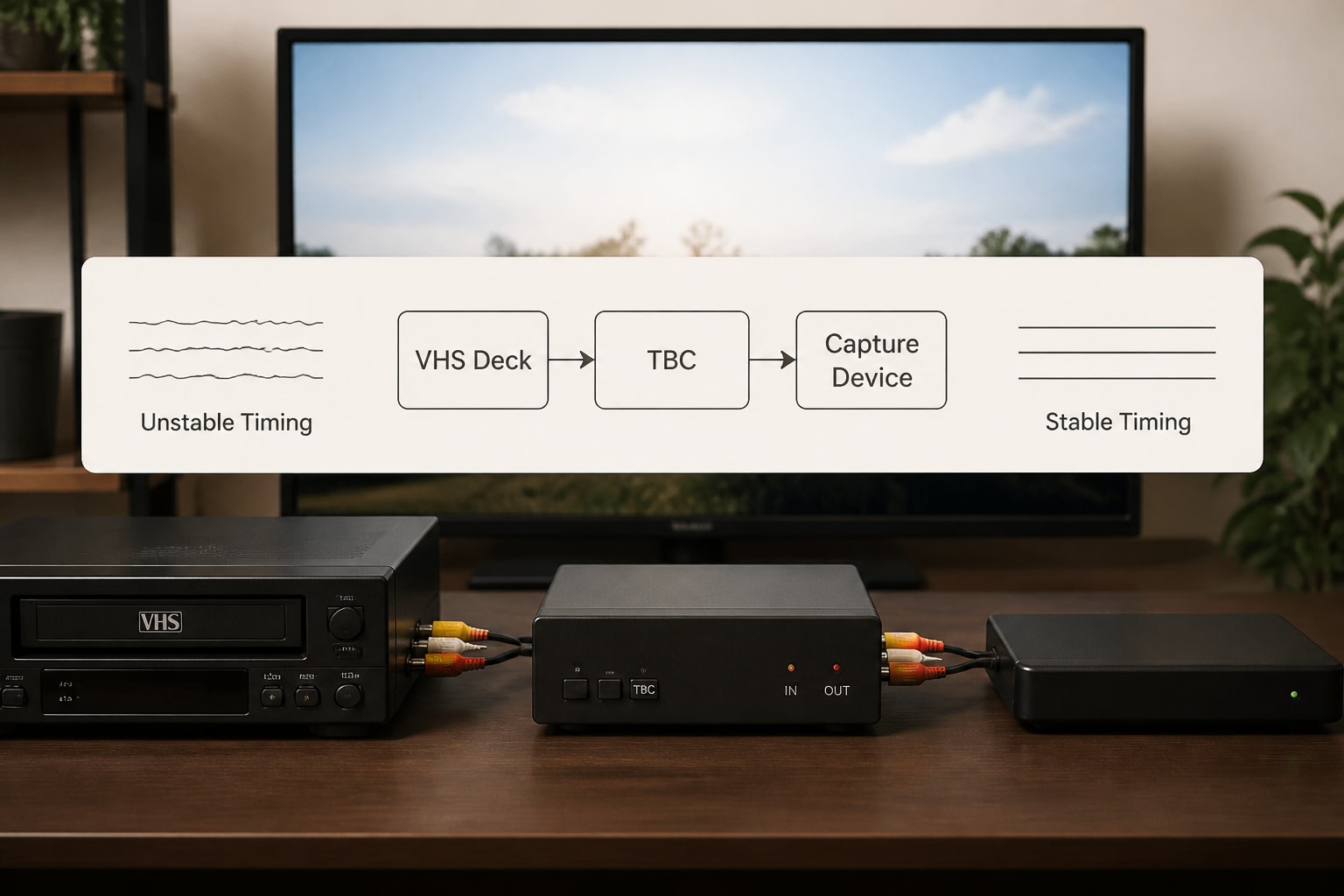
A time base corrector VHS setup stabilizes the timing errors that consumer tape playback produces, so your capture card or converter receives a steady signal instead of a wobbling, tearing or dropping image. For digitization work, the right choice depends on three things: whether your VCR already has a built-in TBC, whether the unit offers full-frame correction, and how well it pairs with the capture hardware downstream.
This guide walks through how a TBC works, the types available, the specifications that matter, and how to match one to the decks in your shop.
What a Time Base Corrector Does for VHS Playback
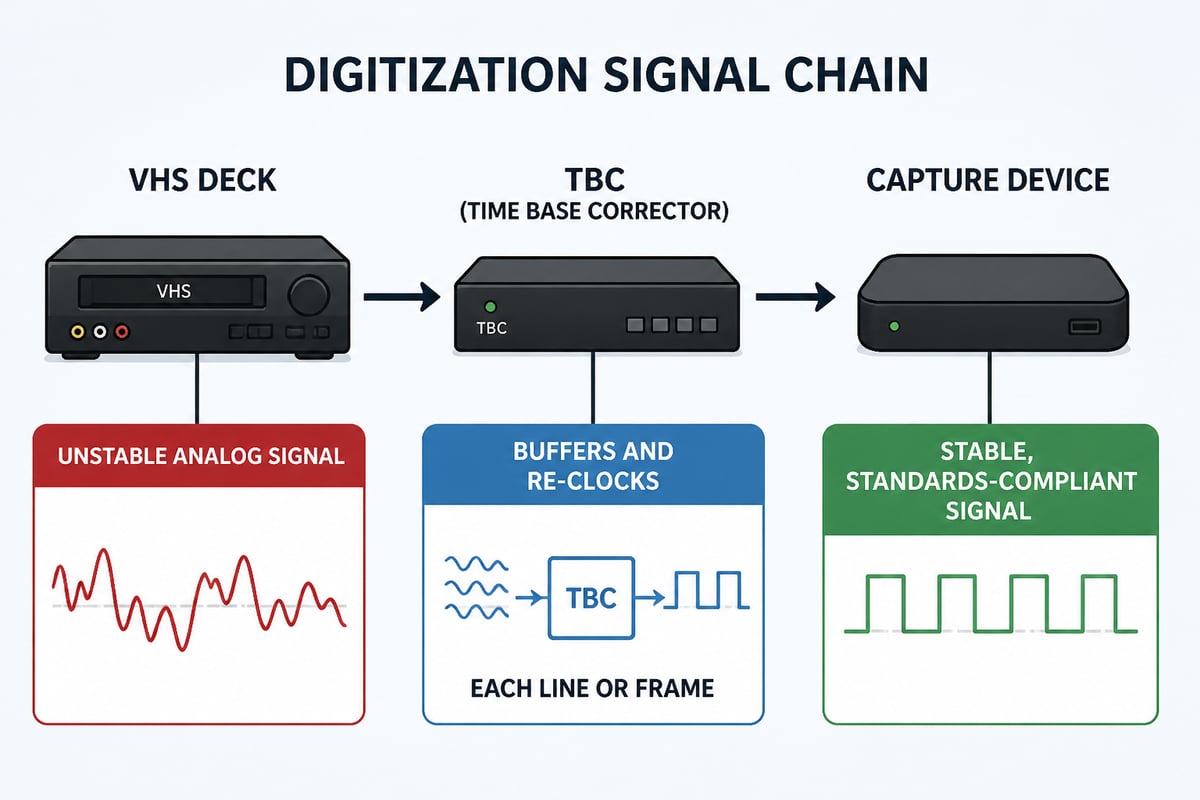
A time base corrector (TBC) buffers each video line or frame coming off a tape and re-releases it on a stable clock, removing the timing jitter that mechanical tape transport creates.
VHS stores video as a helical scan on a spinning drum. Tape stretch, head wear, speed variation and mechanical wear all introduce small timing errors in every line. A television tolerates these errors because its circuitry locks loosely to the signal. A capture device is stricter. It expects a precise, consistent sync structure, and when it does not get one, you see:
- Horizontal wobble or "flagging" at the top of the frame
- Tearing and skewed vertical edges
- Dropped or repeated frames
- Capture software that refuses to lock or loses sync mid-transfer
- Audio drifting out of sync over a long recording
The TBC fixes this by writing incoming video into memory and reading it back on a reference clock. It can also regenerate clean sync pulses, which matters when a worn tape has weak or damaged sync.
Line TBC vs. Full-Frame TBC
A line TBC corrects timing errors within each scan line, while a full-frame TBC stores an entire frame and re-times it as a unit, which also corrects errors between fields and frames.
The distinction drives most purchasing decisions.
| Feature | Line TBC | Full-frame TBC |
|---|---|---|
| Corrects line-level jitter | Yes | Yes |
| Corrects frame-level sync issues | Limited | Yes |
| Handles tape dropouts and weak sync | Partially | Better |
| Typical placement | Built into VCRs or inline | Standalone unit or professional deck |
| Relative cost | Lower | Higher |
| Best for | Stable tapes in good condition | Mixed-quality archives and commercial work |
For a casual single-tape transfer, a line TBC often delivers an acceptable result. For a shop processing hundreds of tapes of unknown history, full-frame correction is the safer investment. Tapes stored in poor conditions, copies of copies, and recordings made on worn decks all exhibit the frame-level instability that line correction cannot fully resolve.
Some units sold as a time base corrector VHS solution are actually frame synchronizers, which is a closely related device. A frame synchronizer aligns the signal to an external reference, while a TBC focuses on removing jitter from the source. Many professional units do both, so check the specifications rather than the product name.
Built-In TBC or External Unit?
A VCR with an internal TBC is the simplest path, because correction happens inside the signal chain with no extra cabling, but an external TBC gives you flexibility and a fallback when a deck's internal circuitry fails.
Several professional and prosumer S-VHS decks include a built-in line TBC, often switchable from the front panel or a menu. These work well and reduce the number of devices on the bench. The tradeoff is that the correction quality is fixed to that deck, and if the TBC board fails, you may be sending the whole machine out for service.
External units offer advantages that matter to production environments:
- Portability across decks. One TBC can serve multiple VCRs, including consumer-grade machines without any correction.
- Independent upgrade path. You can replace the TBC without replacing the deck.
- Extra processing. Many external units add noise reduction, proc-amp controls (brightness, contrast, color), and sync regeneration.
- Easier troubleshooting. Bypassing the TBC isolates whether a problem comes from the tape, the deck or the correction stage.
If you operate a digitization shop, a common arrangement is S-VHS decks with internal line TBCs for routine work, plus a standalone full-frame unit for difficult tapes. For more on how S-VHS decks relate to standard VHS playback, see this overview of S-VHS and VHS compatibility.
Specifications to Check Before You Buy
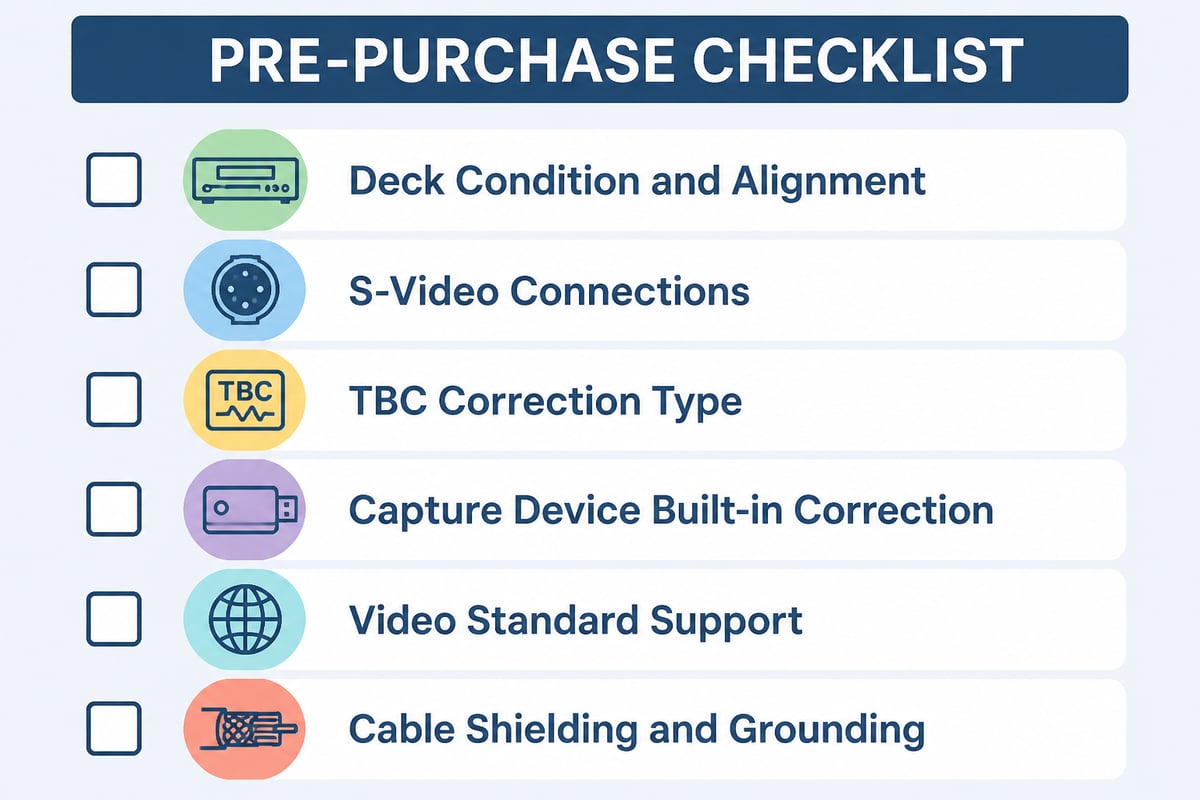
Five specifications determine whether a TBC will perform in a real workflow: correction type, input and output connections, supported standards, built-in processing, and the capacity of its memory buffer.
Correction type and window
Confirm whether the unit is line, field or full-frame, and ask about the correction window. The window is the amount of timing error the device can absorb. A larger window handles badly stretched or damaged tape, while a narrow one may pass through severe jitter.
Connections
The best signal path for VHS is S-Video, since VHS stores luma and chroma separately and S-Video keeps them separate through the chain. Look for:
- S-Video in and out for cleaner color
- Composite as a fallback
- Component or SDI outputs if you capture with professional hardware
- Genlock or reference input for studio synchronization
Video standards
NTSC is standard for North American tapes, but archives often include PAL or SECAM recordings from other regions. A unit that handles multiple standards saves you from buying separate gear for international collections.
Processing features
Proc-amp controls let you adjust levels and color before capture. Noise reduction can help on soft or grainy tapes but should be used carefully, since aggressive settings smear detail. Prefer units that let you disable processing entirely, so you can capture a clean, unaltered signal when archival fidelity is the goal.
Condition and compatibility
Many TBCs on the secondary market are decades old. Capacitors age, and failures often appear as intermittent sync problems rather than complete death. Buying a unit with a known history, or having one serviced, reduces risk.
Matching a TBC to the Rest of Your Capture Chain
A TBC only improves results when the deck, the cabling and the capture device all work to the same standard, so plan the whole chain rather than buying one component in isolation.
The deck matters first. A TBC cannot restore information that a worn head or misaligned tracking never read from the tape. A clean, properly aligned deck feeding a mid-range TBC will beat a neglected deck feeding an expensive one. Shops that depend on consistent output often handle this through routine head cleaning, tracking adjustment and periodic service. VCR Supply offers professional VCR and videotape deck repair that covers bench diagnosis and preventive service, which helps keep the source signal as clean as possible before correction ever comes into play.
Then consider the capture device. Many modern capture units include their own frame buffer, and some pass the signal through a digital TBC internally. Check whether your capture hardware already corrects timing. Stacking redundant correction rarely helps and can introduce artifacts, while a device that accepts unstable input directly may make an external TBC unnecessary for good tapes.
Cabling and grounding deserve attention too. Poor shielding adds noise that no TBC can fully remove, and ground loops produce hum bars that appear in the captured video. Use quality shielded cables and keep power and signal lines separated.
When Renting a TBC-Equipped Deck Makes More Sense Than Buying
Renting is the better choice when your volume is seasonal, when you are testing a workflow before committing, or when you need a deck with proven internal correction without taking on repair risk.
Vintage professional gear is attractive on paper and unpredictable in practice. A used standalone TBC or a deck with a built-in one can arrive with aged components, and the cost of diagnosis and repair can exceed the savings. For a shop handling a one-time archive project, such as a corporate library or a school collection, short-term access to a working deck often costs less than purchasing and maintaining equipment that will sit idle afterward.
Renting also gives you a controlled way to compare options. You can run a sample batch of tapes through an S-VHS deck with an internal TBC, evaluate the results against your capture hardware, and then decide whether an external full-frame unit adds enough value to justify buying. VCR Supply rents professional decks to digitization shops, and its S-VHS deck rental page is the place to review current availability and terms.
Common Mistakes When Using a Time Base Corrector
Most TBC problems come from setup errors rather than defective equipment, and the same handful of mistakes account for the majority of failed transfers.
- Skipping the deck cleaning. Dirty heads produce noise and dropouts that a TBC passes through faithfully.
- Using composite when S-Video is available. This throws away separate luma and chroma and invites dot crawl and color bleed.
- Running noise reduction at maximum. Over-processing removes real detail and leaves a waxy look.
- Ignoring tracking. Poor tracking creates noise bars that look like a TBC failure.
- Daisy-chaining multiple correctors. Two TBCs in sequence can introduce latency and artifacts without improving stability.
- Assuming a TBC repairs physical tape damage. A creased or stretched tape needs mechanical attention, covered in this guide to VHS tape repair, before any signal processing can help.
When a capture still looks unstable, test in a fixed order: try a known-good tape, switch cables, bypass the TBC, then change decks. This isolates the failing stage quickly.
A Practical Selection Process
A reliable way to choose is to work through your tape inventory, your deck condition and your capture hardware in that order, then match the TBC to the hardest case you expect to encounter.
- Audit the tapes. Sample a representative batch. If most play cleanly, a line TBC is probably sufficient. If many show tearing or sync loss, plan for full-frame correction.
- Check the decks. Confirm which already have internal correction and whether it is enabled and functioning.
- Review the capture device. Determine whether it tolerates unstable input or needs a stabilized feed.
- Set a budget that includes service. Factor in cleaning, alignment and the possibility of repair, not just the purchase price.
- Run a test batch. Capture the same difficult tape with and without the TBC and compare frame stability, color and audio sync.
Shops that process large volumes should also consider downtime. A single failed deck or corrector can halt a day's production, which is why many operations pair purchased equipment with a maintenance arrangement or a rental backup. The broader question of how a TBC fits alongside other tools is covered in this look at TBC and VHS workflows.
Frequently Asked Questions
Do I need a time base corrector for every VHS tape?
No. Tapes in good condition played on a well-maintained deck often capture cleanly without one. A TBC becomes important for aged, stretched, copied or poorly recorded tapes, and whenever your capture device is sensitive to sync errors.
Can a TBC fix a damaged tape?
A TBC corrects timing instability, not physical damage. Creases, mold and broken tape need mechanical repair, and heavy dropouts may need a full-frame unit with sync regeneration, but even then recovery has limits.
Is an external TBC better than a built-in one?
Not inherently. Built-in correction is convenient and perfectly adequate for many tapes. An external unit adds flexibility, extra processing and a fallback if a deck's internal circuit fails.
Which connection should I use between the VCR and the TBC?
S-Video where possible, since it preserves separate brightness and color information from the VHS signal. Use composite only when S-Video is not available on both devices.
Your next step is to pull a sample of ten tapes from your hardest-to-play stock and capture them with and without correction, so you have real evidence of which TBC type your workflow needs. If your decks are showing tracking drift, head wear or intermittent sync loss, have them checked first through VCR Supply's professional deck repair, which starts with a bench diagnosis. VCR Supply also rents professional S-VHS, MiniDV, Digital8 and Betamax decks to digitization shops, so you can test a corrected workflow before buying anything.